Designing logos are the ultimate challenge for the graphic designer and there is nothing simple about doing them. The logo is the first and most important visual cue of a company or brand. Logos (usually) should be simple, compact and of one or two colors. Because you have less to play with, it’s the design equivalent of writing poetry. And, like poetry, a lot of people do it; but only a very few people do it well.

It is not the case that a logo will cost an extra 50$ and is just a matter of spelling out the company name in an attractive typeface. I did the logo above for a client who wanted a simple, modern and dependable characteristics displayed through the logo for his communications company.
So, instead of writing about what makes a good logo I’m going to give a few tips on how to use Adobe Illustrator to put together a logo.
Why should you create a logo with vector graphics?
Vectors consist of points, lines, and curves which, when combined, can form complex objects. Whereas bitmap or raster graphics (eg. JPGs) are composed of pixels that contain specific color information. When enlarged, bitmaps pixelate. Whereas vectors will scale up or down without loss of quality or sharpness. So the same vector logo file looks as great on a business card as on a billboard.
So, with logos, it’s vector, vector, vector all the way.
Using Adobe Illustrator to Snap to Point
You can use many different packages to handle and create vectors. My choice of software for doing this is Adobe Illustrator. Whether you have sketched the logo by hand on paper first or whether you are creating the logo from scratch in Illustrator, it’s important to make sure you have Illustrator’s Snap to Point feature running. Snap to Point allows you, when dragging objects, to align an anchor point exactly with another anchor points (anchor points are the beginnings and ends of paths or lines).
So the first thing you must do in Illustrator is to go into Preferences… and choose Selection & Anchor Display and make sure that Snap to Point is checked with a value like 2 px set.

The screenshot on the left above shows the plus sign being dragged by one of the anchor points. The cursor (as we are using the Selection Tool (V) to move the object), is a black arrowhead with a white outline. When the arrowhead is precisely on top of another anchor point while dragging it will turn white with a black outline. At this moment, you know if you let go of the object it will land exactly where you want it to be.
So grabbing objects by anchor points and using Snap to Point to place them in precisely defined positioned is crucial to creating logos in Illustrator.
Viewing and Hiding the Bounding Box in Adobe Illustrator
One of the problems you can face whilst moving objects by a corner anchor point is inadvertently re-sizing the object!
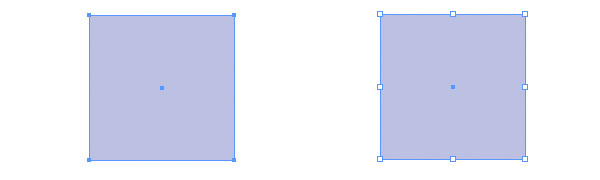
In the image above you can see an object without (left) and with (right) a Bounding Box. The Bounding Box is an extra line around an object with eight white handles which can be using for scaling. It’s very handy sometimes but other times it just gets in the way. To get rid of the Bounding Box, simply go View > Hide Bounding Box or Cmd/Ctrl-Shift-B.
Converting text to outlines in Adobe Illustrator
While doing logos it’s fairly usual that you type out the company’s name in a typeface close to how you want it to look (in this case Dax) and then edit the letters separately. To do this, with the type selected by the Selection Tool (V), go Type > Create Outlines or Cmd/Ctrl-Shift-O. Follow this up with a Cmd/Ctrl-Shift-G or Object > Ungroup to ungroup the letters.
Lining up objects in Adobe Illustrator
Fairly often, when designing logos, you will want to get certain letters to line up. I do this by using the Control Palette which is usually beneath the main menu. When two or more objects or groups of objects are selected by the Selection Tool (V) the Space and Align icons appear.

The use and look of these icons are exactly the same in Photoshop and very intuitive. I use them all the time.
What do you think?
Do you use Illustrator to design or to create logos? What methods do you find yourself using again and again?



Nice tips on designing logos with Adobe Illustrator.
Thanks for this informative blog. This is really a nice tips for designing logos with Adobe Illustrator.
Thanks for this share.
Hey, Danny and Anna, my pleasure. Thank you for your comments.
I agree Illustrator is an excellent program but I cannot believe I use it everyday and missed the alignment tools! This is going to save me lots of time in the future. Thank you very much, great post.
No problem!
Very useful tips for designing logos.
And thanks for this informative blog, you have got many good tips for web designer.
Thanks, Sam, I’m glad you’ve found it helpful.
Thanks Rob! i have just started using illustrator and your post has been very helpful
Great, Tenka, more to come to please keep coming back!
Is any tools or free solutions similar to Adobe Illustrator for such task?
Free open source alternatives to Adobe CS programs.
Great Thanks, Rob!
I agree I think Illustrator is the way to go with Logo design!
I am struggling with a 2 color logo I designed using an old version of Illustrator. When I pull it into publisher or try to use on a web site it puts a ugly thin white border (not box) around the entire logo. Any suggestions? I have tried saving it as every file extension I can think of and it doesn’t help.
Hello, Amy, that could be a variety of things, if you want to send it to me at rob [at] robcubbon.com I’ll put it into a format you can use on the web.
No love for the pathfinder tool? 🙁
I’ve got love for the Pathfinder palette. Even though I have to click on 3 or 4 of the icons before I get what I want 🙂
Very nice, This post was really helpful. Thank you
Thank you, Maria.
Good article Rob, thanks for sharing.
Pleasure, Phil, thanks.