Improving photos with Photoshop by a Graphic Designer

city-south-bank-s

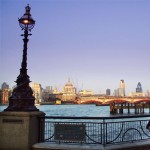
The above picture is one of my snaps taken very quickly at the end of clearish autumn day. I have improved this picture with Photoshop by selecting certain areas and altering the colour, brightness and contrast. I first thing I did was to copy the photo to a new layer (Cmd/Cntl-J) I then use my [...]

How to do distressed, grunge or rubber stamp designs in Photoshop

grunge-s

Put type or whatever you want distressed, grunged or “rubber stamped” on one layer in Photoshop with a white background layer beneath it. The create a blank layer above it (Cmd/Ctl-Opt-Shift-N). Then you need to create some clouds. Very easy. First of all make sure your background and foreground colours in the Tools palette are [...]

Designing photo montages in Photoshop

russia-putin

Although it’s important to cut out images well when composing a montage in Photoshop, it’s definitely not the most important thing. Images should be chosen for their ability to fit in with the other graphic elements in the composition. Usually one piece or element should stick out more than others – the “hero”. It is [...]

Download the free e-books "How to Market Yourself Online" & "Starting An Online Business"

How to get clients online and advice on starting up online!

  • Creating websites
  • Setting up WordPress
  • Writing blog posts
  • Getting links
  • Driving traffic to your site
  • Using social media
  • Getting clients
  • Getting found on Google
download icon
download button

