I often ask the visitors here what they would like to me write about and the most common subject people mention is making your own WordPress theme.
WordPress is a powerful publishing platform which can be made to act and look like just about any kind of website.
What are WordPress themes and how do you make them?
Themes are a collection of PHP, CSS and image files that change the design or “skin” of your website. But they also do much more than that. They can also change the interface, producing different templates for different pages, etc.
There are two main ways to create a new theme for WordPress:
- First you get use an existing simple theme like Starkers and modify it to produce your own theme
- Secondly, and this is the method I recommend, you can get a theme framework like Genesis or Thesis and create a child theme to run on top of the framework.
Setting up a child theme on a framework sounds more complicated but it actually simplifies the process of creating a website.
Using a theme framework makes your WordPress website future proof as these frameworks will be updated along with the WordPress core updates so there’s no way your site will suddenly stop working when you update WordPress.
Theme frameworks
The benefit of using a framework is that the core theme coding is already done and done right. When you create your own custom theme, you are responsible for everything – so if anything goes wrong it’s up to you to fix.
Matt Mullenweg, WordPress founder developer: “Child themes are the only way you should build your WordPress site on top of a framework, and Genesis has great support for child themes and other WordPress functionality.”
I used to create WordPress themes from scratch but when I wanted to add improvements to them, like nested comments for example, I found it would conflict with another element of the theme and fixing it would mean starting again from scratch.
Even if you think you know everything, you will always be asked to do something you’re not quite sure how to accomplish. When using a WordPress theme framework like Genesis you have the support of thousands of top quality developers – and amongst them there is bound to be someone who knows the exact and best solution to any query.
Here are some other advantages of using theme frameworks:
- Good for SEO. Frameworks such as Genesis and Thesis are much better structured for SEO. WordPress SEO expert Joost de Valk gives Genesis 5 out of 5 for SEO. The SEO controls are so good you don’t even need an SEO plug-in, although if you do want one it’s fully compatible and transferable with Yoast’s WordPress SEO plug-in and others.
- Quicker to develop with. Because it is all expertly coded and follows best practices it allows you to cherry pick the best elements (drop down menus, post thumbnails, jQuery sliders) and drop them into your design.
- WYSIWYG controls. Theme frameworks have robust settings sections and widgetized areas, enabling drag-and-drop control over the website’s elements, allowing design changes without coding.

The reasons I use Genesis
I’ve been using Genesis for most of this year and I can honestly say that I’ll never go back to writing themes on my own again. I can do everything I want with Genesis and I can do it quicker.
Yes, I’m using affiliate links in this article so if you make a purchase through one of the links I may get a commission. However, I would never recommend something to you that I don’t use myself. And this is why I use Genesis:
- Support. The documentation and developer support is awesome. You can ask how to do something through their forums and an expert developer will tell you within hours.
- Future-proof. Studiopress are always looking to the future. The next release, Genesis 1.8, will be responsive and create different device-dependent versions of the site for mobiles, iPads, tablets, etc. This is a big winner for me because the mobile web is going to be huge and so far the WordPress mobile plug-ins are not very customizable.
- Compatibility. It’s totally compatible with all the major WordPress extensions such as Gravity Forms, bbPress, WordPress Multi-Lingual, etc.
- Price. It is, actually, rediculously cheap. And cheaper than Thesis or Headway. Just $60 for the framework – which is all you need. You can create as many sites as you want and have access to the support. $60 is a small price to pay for total certainty in SEO, security, and website development.
Darren Rowse – Founder ProBlogger.net: “Genesis lets me sleep easy. Knowing my blog is well optimized, secure and easy to update lets me get on with developing content, community and building a business from my blogging.”
Creating a child theme on the Genesis framework for WordPress
I have just made 10 videos explaining how I create websites – from the Photoshop mock-up to the finished site online. I’ll be writing blog posts about every stage of the process over the next few weeks. You can see all the videos on my YouTube channel now.
Here is the first video where I create a Genesis child theme for WordPress.
I always start to create a WordPress theme and website locally on my computer before loading it up to a host for final tweaking. It only takes a few seconds to install WAMP (PC) or MAMP (Mac) on your computer and run WordPress locally and I recommend you do so when creating themes.
Once you have WordPress up and running you need to install your Genesis theme framework and your child theme. You will get your copy of Genesis as soon as you make the purchase. Un-zip it and put it in the /themes/ folder which, as you know, can be found in /wp-content/ amongst your WordPress files. No need to touch that folder ever again – all your theme changes will go in your child theme.
And then to load your child theme download a sample child theme from the StudioPress website or here:

You may want to re-name the child theme by changing the folder name and editing the style.css and the functions.php, but put the child theme next to the Genesis theme in the /theme/ folder and activate it in the WordPress back-end.
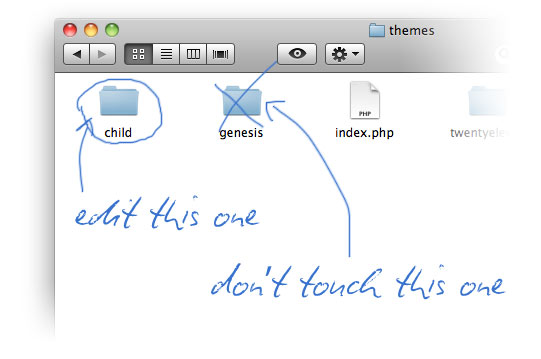
90% of the changes you make to the child theme will be to the CSS file. The other 10% – adding custom page templates, removing certain elements from certain pages, adding widgetized areas, etc., these changes can all be put in the functions.php file. Here is the functions.php file of the above sample child theme.
<?php

/** Start the engine */

require_once( get_template_directory() . '/lib/init.php' );

/** Child theme (do not remove) */

define( 'CHILD_THEME_NAME', 'Sample Child Theme' );

define( 'CHILD_THEME_URL', 'http://www.studiopress.com/themes/genesis' );
If you add any code to the above, make sure it’s below the '/lib/init.php' ); line and that there are no spaces after the last character in the file.
Don’t worry about getting your hands dirty with PHP. The solution to any requirement you have of Genesis will either be in the documentation or will be sorted out in the forums. There are also a couple of Genesis plug-ins (Simple Hooks and Simple Edits) which further simplify the process. And once you start pasting in PHP you begin to understand the logic behind it.
What do you think?
I’m really looking forward to sharing my methods of developing websites – there are 9 more videos to come! Do you use a child theme on a theme framework to create sites or do you create your own custom themes? What are the advantages and disadvantages of doing it your way?
And, is there anything else you would like to know about creating WordPress sites?
Be sure to leave your comments and questions down below and, if you wish, click on one of the buttons down there to share! 🙂



Hi Rob
As usual, you have done an outstanding job. Every article of yours I have read over the past three or so years has been absolutely terrific. You always ‘speak’ to your audience as the intelligent people we are who need informational or technical guidance, help and/or tips.
Other authors I used to read (please note my use of the past tense) speak to their readers as if we are complete dum-dums who are inferior to the writers because we don’t know all the ‘how to’ steps and jargon. I have spent the past two days unsubscribing from email subscriptions from a lot of authors as I had gathered FAR too much information and, instead of gaining clarity as I had expected, simply ended up confusing myself into ‘analysis paralysis’.
I don’t know why I didn’t wake up earlier that the only person I need to ‘follow’ to learn what I need to know is you. You are a highly credible authority figure in my opinion and if I ever get the chance to recommend your excellent e-books, website and/or services to anyone, please be assured I will. It will be my pleasure to do so.
Anyway, I’ve cleared my email Inbox of all the junk and will now follow only you. What a relief! Only one email to read at a time instead of literally hundreds and only one ‘voice’ to which to listen. I will attempt to do my best and be a good student of yours. I hope one day to make you proud of me by actually producing a WordPress website which has quality content, excellent production values, ‘state-of-the-art’ Internet marketing/SEO AND which makes money!! Won’t that be good?
My self-imposed deadline is to begin producing this miracle on Wednesday 1 February 2012; I need to finalise some personal projects and survive Christmas/New Year/Australia Day (Thursday 26 January 2012) parties first! In the leadup to that deadline, I will re-read voraciously every article/email I have received from you. My uncluttered learning with a clear mind starts NOW.
I really enjoyed this article. I haven’t had the chance for reasons I explain above to do the ‘hands on’ work, yet I know when that time comes, this article will make it easier for me to do so.
Thank you again for all the hard work you do researching, writing and posting fantastic content for all us ‘newbies’ stumbling round in CyberLand. (I suspect there are quite a lot of not-so-newbies who rely on you for quality information, too.) I have read in the tsunami of Internet marketing/traffic generation emails I’ve received previously that researching, writing and posting quality content articles at regular timeframes on a variety of aspects of a subject leads to an author being regarded by readers as an extremely authoritative and credible ‘go to’ source. In other words, grateful readers regard you as an expert and then refer their networks to you so you grow your business. This marketing tactic is super-obvious and super-simple; the first time I read it I thought ‘Duh!’. This was a tactic I used for the 26 years I worked in offline marketing.
Well, mate, as we say in our friendly manner Down Under, I have to say you have ‘worked’ this tactic a treat. I DO regard you as an expert and thank my lucky stars you exist. I had gathered SO much information before, I didn’t know where to start reading, nor what to do once I’d finished reading. You have saved me from all that s**t and I’m very grateful to you. Good on you, Rob.
Your self-appointed No 1 fan in Australia, Caitlin Foster
Hello Caitlin, well, thank you very much for your kind words, I really appreciate them and I’m very humbled.
Yes, I do try to create as much useful content here in order to garner traffic and referrals, etc., and that has been a tactic that has worked for me in the past.
With regards to your WordPress challenge you have set yourself, that sounds great! If you have any questions about WordPress, or anything else, please get in touch because I’d be happy to help. And, I can’t wait to see the results of your endeavors!
All the best, Caitlin, you really are too kind!
I’ve been debating which framework to start using having experienced so many problems creating my own wp themes, so you’ve helped with my decision. Look forward to the rest of the tutorials.
Thanks, Karly, I hope you enjoy the other tutorials which will be coming soon!
Because I have not actually finished reading all your tutorials, I might actually be asking a question you have answered elsewhere; if so, apologies.
Rob, when a person (say, me!) sits down to actually begin technical production of a WordPress website, what is the best way to create content ready for uploading to the website? I have created literally hundreds of pages of content in Microsoft Excel and Word over the years; my expectation is that I can just ‘cut-and-paste’ it into my preferred theme.
Is this correct? I was very surprised – actually, a bit pinged-off – when I was mucking around with Joomla in the first half of this year that it was not possible to do that with that particular WCMS. Joomla required me to cut-and-paste my content into Notebook, strip it of its formatting, then upload into the template, then re-format it. It was VERY fiddly and time-consuming, with lots of mucking around.
I hope I can just simply cut-and-paste my Excel and Word documents into WordPress. I have so many of them I really do not want to have to retrace my steps and rewrite them and/or strip them of their formatting, then re-apply the formatting.
Please tell me how to upload already-existing content into a WordPress theme in the most energy- and time-efficient manner possible.
Thank you from Caitlin
G’day Caitlin, good question. This is fantastic news that you already have this great content gathering cyber dust on your computer. You can cut this up into 500-600 word chunks and put it out on a WordPress site – as long as you get a few links coming in and that the site is indexed by Google, this can win you a bit of organic traffic straight off the bat!
Anyway, good news, the answer to your question is “yes”. It seems that you can paste in an Excel table to WordPress and it converts it to HTML. There is also a paste from Word button which will convert the formatting and links in your Word docs to blog posts or web pages.
There will be a bit of trial and error but there’s a thread about this in the WordPress forums here.
Hello again Rob
Thank you so much for your prompt reply. Your promptitude is part of your professionalism. And no, I’m not kind (except to animals. Lol …). I’m merely speaking My Truth!
Great news that I can paste in an Excel table to WordPress and it converts to HTML. Where do I find the ‘Paste from Word’ button? In Word itself or WordPress? It will be brilliant to be able to convert the formatting and links in my Word docs to blog posts or web pages. I dreaded having to re-key everything into a WordPress theme from scratch.
Also, just to let you know, when I eagerly clicked the link to the thread about this subject in the WordPress forums, I received a ‘404 error: page not found’ message. Was this a thread contributed to or started by you? If so, are you able to re-post it in this blog/tutorial series, please? I’m sure I’m not the only person who wishes to be able to do this; there must be lots of us who follow you who would like to save as much energy and time (and therefore money) as possible.
Thanks, Rob. Hope you are able to do this. Or, if not, perhaps give a ‘heads-up’ as to where I could obtain ‘how to’ step-by-step information. Thank you once again.
Cheers, as always, from Caitlin
Sorry, I made a mistake with that link. I corrected it above and here it is again: http://wordpress.org/support/topic/how-can-i-add-my-table-from-excel-into-a-post – the button is in the WordPress page or post editing area. I hope this helps. Let me know how you get on.
PS: If I can’t just cut-and-paste Microsoft Excel spreadsheets into my preferred WordPress theme, how do I create tables in it? I need to have a lot of tables in my content as they are the easiest way to communicate to my visitors/subscribers (when I have them) the information I wish to share with them.
see above 🙂
Rob,
Once again you have a great idea and format for us. I eagerly look forward to seeing the remaining videos. I agree with Caitlin above in that clarifying things you ultimately enable us to plow ahead with a process that does not come naturally to some.
Alan
Hello Alan, I’m delighted that I’m helping you. This is a process I have had lots of problems with over the last few years but one that I think I have mastered now so I’m looking forward to divulging many more tricks of the trade here soon. Thank you.
Hello Alan
Yes, isn’t it terrific to have clarity instead of confusion? I don’t know myself!
Best wishes for your WordPress success.
Cheers from Caitlin
Caitlin,
Thanks for your thanks, I look forward to seeing your project(s).
My best friend here in my town, my mechanic too has a daughter named Caitlin and I always thought it was such a delightful name.
Cheers from Georgia USA
Hi Rob
Im also using gensis now but with the standard themes
Great tutorials very helpfull. Keep up the great work.
Steve
Ah, if you ever need any help with Genesis, Steve, be sure to drop me a line. It’s good to get all their themes as well. Or you can buy individual child themes at about $20 a pop.
Hi rob
I sure will 🙂
Im really busy with new clients 🙂 so not had much chance to play with gensis but most things seem good.
thanks for help so far
steve
p.s. whats happened to meet up I guess next year now?
Glad to hear you’re busy with new clients. Yes, I think next year would be good for a meet up. I’m pretty busy and I’m looking forward to a New Year with a bit of free time. Most people want an afternoon meet-up. There’s a thread open for it at the LinkedIn Group.
Hi Rob, I have recently started creating websites using wordpress after reading your material and watching the video above. My question is this :
With wordpress is it harder to undertake SEO for them than a normal .HTML site?
As I have been struggling to get my site http://www.arrowpc.com.au and my clients site http://www.disasterrecov.com.au to start even remotely ranking in search engines.
Any advice I could get on this topic would be very beneficial. Thanks in advance and I am definitely looking forward to reading and viewing more of your work.
Regards,
Brett Poole
Hi Brett, good news! WordPress is actually easier to rank with Google that a normal .html site, in my opinion. There’s plenty of information on that here. The best thing you can do is to download my e-book called: How to Market Yourself Online. And there’s other stuff I’ve written about on page SEO, how to get links to your website, and WordPress SEO – 10 essential actions. That should be enough to be going on with! 🙂
Hello Rob, you have an uncanny knack of writing just what need. I was just weighing up Thesis against Genesis and just bought Genesis through your link. Keep up the good work.
Hello, David, I’m delighted you’re finding my stuff useful again! Thanks for buying Genesis through my link. You won’t look back, trust me – and it’s cheaper than Thesis. You can build hundred of websites in Genesis for just $60.
If you have any Genesis questions, be sure to drop me a line. The forums are pretty good as well!
You’re not wrong Rob. I’m very impressed with Genesis. I’ve just been moving a HTML site to WordPress. It’s so quick to get rid of unneeded WordPress stuff (comment and post meta data etc.) with the child functions.php. I particularly like that the child style-sheet stands alone. If only I had done this earlier.
I’m so pleased you’ve taken to Genesis so well, David. It took me a while to get to grips with the filters and hooks in functions.php – but now I really love it too!
Hi Rob,
You just opened my eyes to the possibilities of Genesis via “LinkedIn” post and I am looking forward to getting my hands dirty soon . I’ll keep you posted and hope to be speaking your praise as above soon.
Thanks, Yvan, I’d love to hear how you get on. 🙂
This is great, you provided me with a lot of helpful tips on how to improve my WP themes. I prefer to use Lubith in order to generate them because it’s a lot easier and faster than starting from scratch, it really is a great tool both for beginners and those who know CSS or HTML. I save a lot of time designing my themes this way and you helped me understand better how the coding works and what I should do to get the results I need! Thanks a lot!
Thanks a lot for that, Ryan, I’m glad you’re finding WordPress theming easier. I’ve never used Lubith personally, I’m enjoying Genesis at the moment. More WordPress stuff to come! 🙂
Rob makes it so simple. Perfect solution for newbie. Thanks for this amazing article.
Thanks, Kath.
Rob,
i’m a newbie and been reading about wordpress, genesis and thesis. Here are some questions i have so far:
will i need photoshop or similar program to use or create things for the themes? are there free resources online for a mac instead of buying photoshop if needed?
finally, i am not sure how often i will be posting blog posts so can i still use the themes and set it up so that i can just change content when i want rather than posting every week etc.? i realize this may affect the advantages of seo and blogging but i’m not sure i would be able to develop that much new material right off the bat.
Hello Ed. Thanks for your comment.
No, you don’t have to use Photoshop. GIMP is a free open source alternative and is sufficient for most web design tasks. There are also online image editors.
Yes, you can use WordPress to create a website without a blog. Yes, not blogging is not good for SEO and you’re more likely to come up with more content ideas the more you write!
Hi Ed
I know this is for Rob, but if it helps there are loads of free on-line image editors which are very simple and powerful: Picmonkey, Pixlr and Photoshop express are just a few.
Is you do require a more complex freebie (with some learning curve) there is Gimp which seems to be available for Mac now: https://plus.google.com/+gimp/posts/gVs8g65yaUM.
I would guess if your theme is close to what you want most of the styling will be done by changing the CSS . Rob’s got some good videos if you go down the Genesis route (I certainly have for future work – worth also going via Rob’s affiliate link https://robcubbon.com/go/genesis – it is well earned. )
The answer to your second point is yes. You have a fully editable website, but I’d definitely worth thinking about what Robs says here: https://robcubbon.com/not-blogging-read-this/ . It’s a bit hard to image though how you would keep adding to existing pages if not blogging, but you know what you have in mind.
Good reply to Ed, David, thanks for that. And thanks for the kind words.
Nearly all the websites I create for clients now are built using WordPress, so far I’ve been creating a new theme for each client but your article has really started me thinking about the way I currently do things.
Genesis sounds like it could be worth its weight in gold and would help me create client sites a lot quicker. I think I’ll be giving Genesis a try Rob and as a thank you for the useful information, I’ll be purchasing through your aff’ link when I do. 😉
Hello Mark, I used to do a custom theme for each client but I’m so glad I moved over to Genesis. It takes just a bit of time to get to grips with it but after that it really speeds things up. Plus you have more peace of mind that things won’t break in the future. I appreciate if you buy through the affiliate link. But no drama if you don’t. 🙂
Hi Rob
Great post and video. I used Genesis 1 year ago and always found it too difficult to change the css for non coder like me. Also missed a more real time editor. That is why I used a theme from a well known site where the theme had included theme options in like font, background color and so on. However I now realize the theme is so slow partly because of too many CSS files. So now I want to move back to Genesis. I am torn in between 3 things. Learned it the hard way like you are showing in the video. Use Dynamik Child Theme (with Genesis framework) where you can control everything by simply choosing them in drop drown stule. Or lastly use Genesis child theme but use Genesis Extender Plugin. Do you have any knowledge about these?
I wanna go ahead with the right tool. Do not wanna skip any corners only to experience limitations in the future.
Thank you.
John
Hi John, I really can’t comment on Dynamik Child Theme nor the Extender Plugin. I’m sure both are a help but as I’m fairly comfortable with CSS (and also both aren’t made by Studiopress) so I’m probably better off without them. But that’s not to say that they aren’t right for you. We all have different needs.
CSS is easier nowadays that it used to be when the older IE browsers were more widely used. Also the CSS and HTML in Studiopress is so well-written that almost everything can be sorted out with one quick CSS change. Use Chrome, Firefox and IE Developer Tools and/or Firebug for Firefox to make CSS changes on the fly. It teaches you a lot.
Sorry to not be of more help.
What is the difference/advantage to creating/installing a theme?
The advantage of creating your own theme is to make your site look unique and customize it completely to you wishes.
Hi Rob,
Thanks for the great introduction to child themes with Genesis! I will also check out your course on Udemy. Looks good!
Thanks
Thank you, Victor, let me know if you need any help with Genesis 🙂