
Remember Adobe Streamline? Adobe stopped upgrading its vector conversion application some time ago. But with the advent of CS2, Illustrator’s old Trace Tool became the new super Live Trace and opened up a new world of possibilities!
As soon as you place or paste a photo into Illustrator a button on the Control Palette offers a Live Trace option. However, I like to see all the options first off by going, Object > Live Trace > Tracing Options…
Here you can choose Color, Greyscale or Black and White from the Mode drop down menu of the Live Trace pop-up box. Marilyn Monroe below was done by colouring up Live Trace with the default, Black and White option.
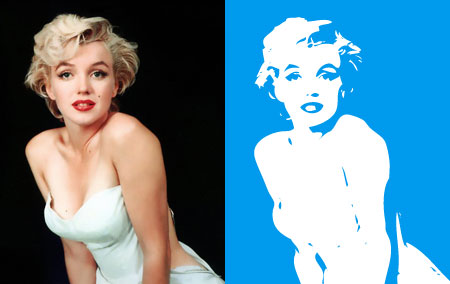
This is the Illustrator/vector equivalent of Photoshop’s Image > Adjustments > Threshold…
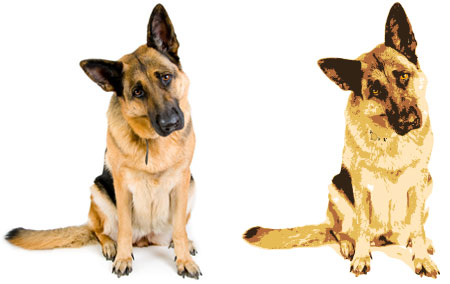
The drop down menu next to Presets: in the Tracing Options dialog box gives you thirteen different tracing presets. However, if you ignore the presets and choose Color from the Mode drop down menu and enter a value in the Max Colors box you will see an identical effect to Posterizing in Photoshop – a finite number of tones within a colour picture. There are only 5 colours in the illustration of a dog below.
Photos are made up of pixels and making them larger makes the pixels larger too and the result can be blurry and jagged or “pixellated”. They are bitmap images and their file formats are .BMPs, .JPGs, and .PSDs. Vector images are composed of mathematical formulas that consist of curves and points. They can be resized without losing quality. Vector’s file formats are usually .EPS (although EPSs can be bitmaps) and .AIs (Adobe Illustrator’s native file format).
You may find the colours chosen by Illustrator are a little dull. Hit the Trace button and go Object > Expand… to turn your pic into Vectors. At this point you cannot go back and edit your trace (only with a Cmd/Ctl-Z). Another advantage of these resulting vectors is the ability to re-colour them as above with Kuala Lumpur’s Petronas Towers.
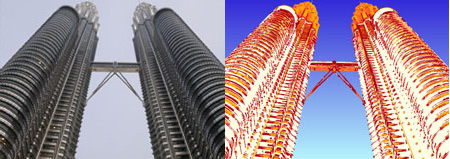
To re-colour: simply select one of the colours you want to change with the Direct Selection tool (A) and go Select > Same > Fill Color and move those sliders!
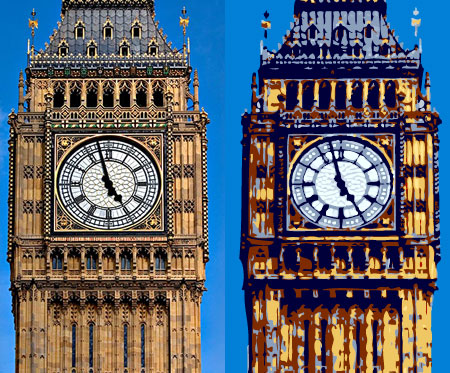
Lastly, play around with the blurring option in the Tracing Options panel in order to create more figurative, impressionistic illustrations as with Big Ben below.
Using Adobe Illustrator Live Trace to turn photo into illustration
Overview: Go Object > Live Trace > Tracing Options once you have Placed or pasted your image into your Illustrator document. Make sure you have the Preview check box checked so you can see your chosen options before you hit Trace. Remember you have to go Object > Expand to turn the trace to outlines/vectors.



hi i enjoyed the read
I’m glad you enjoyed it, Kianna.
This is likely a view that stems from me being an illustrator, but feel like this mentality is behind a lot of the lackluster illustrations and even logos in a lot of publications. While i’m not averse to photo-reference being used, or even using photos as part of the illustration, photos aren’t illustrations, and just throwing a few filter-driven modifications at it wont change that fact. It seems to me like a case of ‘stick to what you excel at’. Much as design, this is something that takes a lot of time to get right, and every time I see a designer cutting corners like this, I can’t help but think of the great illustration that could’ve accompanied the lovely design. It’s something that i can see being used as one step in a time-saving process, but not the first and last step.
And I apologise if this seems offensive, it’s mostly meant as a way to get a discussion going, and certainly not as a stab at your work. I love reading your blog, it’s indispensable for someone just trying to get into professional design.
I’d love to hear what you think about it, so, what do you think?
Hi Michael,
how are you?
I am a fashion photographer and need help with one issue.
Do you have an email address?
I would like to ask you a question as an expert illustrator that you are.
Thank you.
I really appreciate it.
Scott
I just realised this was also partly in response to another post in which you stated that this could be an easy way to get around hiring an illustrator. See, i just feel threatened, haha.
Hello Michael,
I understand exactly what you mean. I really should have titled this post “How to use Live Trace in Adobe Illustrator CS2 & CS3” but I didn’t because I thought the above title would better satisfy my traffic greed!
Did you see my post about using illustrators to help with designs where I showcase some work of an illustrator, Rory Walker, I’ve used? I included 2 illustrations of his, both I could never have done on the computer, or even come close to. There’s a contact of an illustrators’ agent there, if you’re interested.
Basically, you’ve got a very good point about lacklustre illustrations. It’s the other side of the DTP coin that gave us the greater and more democratic scope for creativity. I agree with you that an illustration should produce something you couldn’t achieve with a photo.
In defense of the above technique – This can be used as just one technique within others to manipulate imagery to create something unique and creative. Also, it can be a quick fix way of getting a vector (an outline of Australia, for example) without incurring any financial or time cost.
You certainly don’t seem offensive! This is just the sort of comment I love because as you say it get discussion going.
Also, Michael, if you’d like to write a little piece on this or anything else, you could publish it here with some of your samples. Just a thought!
I did happen to see see that post, yes, as well as the one where you’re asking for portfolios. I love nothing more than to see expert design (layout/type/logo) coupled with beautiful illustrations. I’m trying to get a job as an artworker now, and I almost feel like the illustrator pretending to be a designer, and as if I’M using tricks like these just to get by, hah. To be fair though, I was trained to be a designer, so likely I wont do all *that bad.
Thanks for the suggestion, by the way. Maybe I will write up a little article about this, it’s an interesting topic. It’s great that we have the technology, automated vectorisation is wonderful, it just gives the same ‘power’ to people that photoshop filters do. And I love filters as well, it’s just that when a work smacks of filter-abuse, it’s rarely any good 😀
Now i’m off to my prospective ‘workplace’ for a trial-week. That is, if the shutters aren’t drawn again, as they were yesterday when I was supposed to start. Not a good sign, that.
Best of luck in your new job, Michael. Artworking does improve your design eye, I believe. You make another good point about filter-abuse. I’m sure the visitors to this website would love to read more of your opinions!
Very interesting blog. I like your simple and practical tutorials. Cheer!
@Blogging Mix. Your site looks very interesting too. I shall check it out soon. Thank you!
Matthias Guenther from Quark in Hamburg who is a regular visitor to this site has pointed out that these effects can be achieved in Quark through their Picture Effects palette. Of course the tool is not as powerful as Illustrator’s and it doesn’t convert to vector but for a quick effect it is a fast and easy thing to do.
Have a look at the example he sent me.
fantastic..have gain some ideas after reading your blog…thx for sharing your exp…
Both the photo and the drawing of Marilyn were excellent.
Thank you for your comments, Miss Lingerie and Marilyn. I can do the drawing of Marilyn to a certain size and colour scheme in return for a link, if you want.
Excellent tutorial Rob. I am always looking for good design blogs. You have another RSS reader now and probably a link in an upcoming article.
Continue to Be Awesome.
Thank you, Awesomeness, I’m sure they’ll be lots of stuff of use to find here. And I’ll always welcome a link. Cheers!
Nice Tip.
I will check my illustrator, lets see if its easy for me.
I should have come across this blog earlier, anyways am still glad I atleast found it now.
Jonathan,
bhutan web hosting
Give it a go, Jonathan, it’s easy!
thanks for the info, i am creating a few t-shirt designs and was wondering how to create this effect, you just saved me a ton of time!
Interesting. Similar functions in Photoshop also, although I haven’t really used them.
I have to admit I agree with previous comments that this posterizing effect done by some editing program tends to be rather crude, and not very appealing IMHO.
Photo-tips Dans last blog post..Fill the Frame – Get Close!
Thank you, lhtd, I’m glad I’ve saved you some time.
Hello, Dan, I think it depends on what you are using the effect for. It’s very useful if you want a simple vector outline for example. Cheers!
Ah! that’s a neat trick! It’s fast and I’m sure this will help in increasing the use of these kind of illustrations in blog posts too.
You have very nice tutorials. Subscribed to your blog
Nice entry Rob
Your idea is simple and fantastic. It makes an image look more dynamic and unique as compared to any other photograph. Looking forward to read some more beneficial tips here.
Hi Blog Design Studio, I’m delighted, as always, that someone has decided to subscribe to my blog. Yes, hopefully there will be more handy design and marketing hints to come. One about Powerpoint presentations to come!
Thank you, SEO Next, I can’t believe that this method is so useful and so easy. Don’t forget that vector illustrations are completely scalable – they can be reproduced at any size without any loss of detail!
Hi, I was looking for pictures of Big Ben when i came across your Photo and Illustration of Big Ben, I was just wondering wether you were a Photographer by trade or an Illustrater or possibly both?
I have chosen Photography – Art in College and wondered if you could give me any good tips for use of Photography, what camera i might be best going for and any other general tips.
Any feed back would be much appreciated.
Hi Ben, I’m more of a marketer and designer than anything. Not a photographer but I do take a lot of photos and that will be my advice to you. I’m not sure about cameras but I do like a large margin of zoom in focal length (if that’s the right terminology!) Hope this helps.
I’m trying to download the adobe streamline, but I still did’nt succeed. I do my arts
jobs in a Mac (mini Mac), and I think it is not compatible with it. In my older machine, an G3 (also Mac) I had no problems to work with.
Does anybody know what is happening and how I could handle it to have my streamline back?
thanks
Very good breakdown of how to use illustrator. I find it to be a great program with a lot of possibilities to work it.
Thanks from Argentina!!
Hi all!
That feature of adobe illustrator is so simple but yet so powerful. It’s easy when you have managed to learn it, this tutorial is another must learn for illustrator newbies
Hello avelino, Adobe Streamline isn’t being supported anymore, you need Adobe Illustrator CS2 or CS3.
Hello Adobe Flex Training, I’m always using Illustrator either for web or print design.
Hello Adriana, it’s a pleasure from England!
Hello Patrick, I agree it’s a hugely powerful feature of Illustrator and very helpful when doing general designing.
Wow! I got a lot of cool info here. Thank you for recommending Adobe Illustrator CS2/3. I’m planning to buy the photoshop but I think I’ll buy this one instead. Many thanks 🙂
Thanks Rob, for sharing this tutorial.. I really like it.. actually i’m not good in Adobe illustrator, but I want to try it by refering your tutorial.. Thanks again..
Thank you Roselyn and Melayu, I actually can’t do without Photoshop or Illustrator but I’m glad you have found this post useful.
Great article – a lot of people would say the only way to guarantee a perfect transition from bitmap to vector is to simply trace the whole image by hand. Preferably the black outlines first and then colouring. Halftones still present a problem for me!
I think you’re right, Paul, sometimes, especially if the original bitmap is of poor resolution, the best way to do a vector is to trace by hand. It takes time but at least you’ll know you get everything looking smooth and as it should.
i am really a noob when it comes to illustrator 😛 I hope u will continue to provide useful articles like this.
I’ve done a few more articles about Illustrator, Scarlet.
good ideas
Thank you, Rohan.
Thank you soooo much!!!
Pleasure, Jill.
Yeah Nice Tut! I found it just few hours ago and when i googled it for some enhancement , i saw your blog. very interesting feature. at-least i can design T-Shirts more professionally.
Thanks
Thanks, Osama, best of luck with the t-shirts. 🙂
Wow! Awosome. this tutorial very helps me to improve my skills on Illustrator. thank you so much.
Hello, mjuliakbar, I’m so glad you found the tutorial helpful.