
An essential internet marketing strategy is to make signing up to your list as easy as possible. To do this I like to have a sales page or squeeze page for the list which explains the various benefits of signing up.
If this squeeze page is quite long it’s nice to put an email capture form at the beginning and end of the form. One at the top for those visitors who just want to sign-up straightaway. And one at the bottom for the visitors who, after reading about the fantastic incentives for signing up to the list, wish to sign up without having to scroll up or down the page to do so.
I have set up many email lists with MailChimp. I like MailChimp because they offer all the email list services for free with up to 2,000 subscribers sending less than 12,000 emails a week.
I have already explained how to sign-up to MailChimp and add the sign-up form to your sidebar using WordPress Widgets.
Once you have done that, click “Forms” in the list panel.
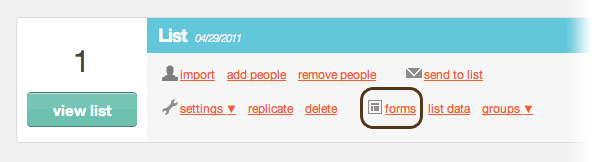
How to create a form in MailChimp
You can create a form on your website so that people can sign up to your list. To do this, first click the Create Form sub-page in the Forms section of MailChimp:

Here you can determine what goes into the form. Do you want first name or last name or any other info? I go for just email address.
In order to get the code to embed into your website’s pages go to the “For your Website” sub-page in the Forms section of MailChimp:

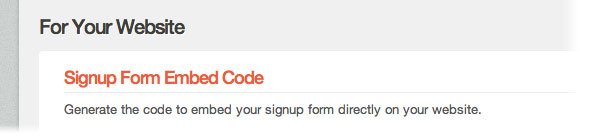
And then click the Signup Form Embed Code link:
Now we’re getting closer to grabbing the code. But there are still several things to do. To the right of the Signup Form Embed Code page you can define more of the structure, design and extra functionality of your form. I like to keep the code as simple as possible. I also like to have as little style in there as possible as I like to style up the form myself. Here are my settings:
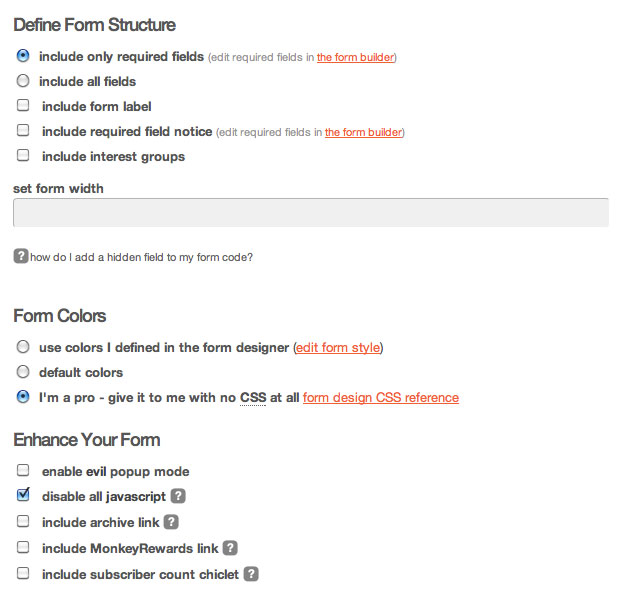
Once you have defined the form to your requirements, you can copy the code from the bottom left of that page where it says “copy/paste into your site”, and … paste it into your site.
Adding More Than One MailChimp Sign-up Form on the Same Page
However, if you want to put more than one form on the same page you’re going to have to do things a bit differently.
Instead of pasting the code from the Signup Form Embed Code page into your site, paste it into a text document (using NotePad (PC) or TextEdit (Mac)) and call it “signup-form.html” or something like that. You may want to wrap the form in a div for styling and add some inline styles. So the HTML document will look something like this:
<style type="text/css">

<!--

lots of CSS to make your form look pretty

//-->

</style>
<div id="sign-up">

at least 50 lines of code copied from MailChimp goes here

</div>
Then upload this HTML document (“signup-form.html” or whatever you called it) to somewhere on your server.
Then in order to embed the code on the page (as many times as you want) you call the HTML in with an iframe like this:
<iframe src="http://your-site.com/mailchimp-form.html" frameborder="0" width="654" height="200">

<a href="http://link-to-form-on-mailchimp-site" target="_blank">Anchor text saying "click here to sign up" or something like that for people whose browsers can't read iframes</a>

</iframe>
As you can see above, inside the iframe tags is for browsers who don’t support iframes. To be honest, I’m not sure which browsers don’t support iframes – so this is just a precaution.
Remember: if you don’t use iframes and just paste the code in more that once, your potential subscribers will receive multiple emails which won’t make you popular.
Getting form code from MailChimp and inserting with iframes
Here’s a video where I show how to get the form code from MailChimp and insert the form multiple times on a page with iframes. The form has the first name and email address in this particular example.
Some examples of multiple MailChimp sign-up forms
Here are a couple of my sites where there are multiple sign-up forms on the same page.
- The home page of a site about how to give up smoking
- And a squeeze page from my WordPress SEO and Internet Marketing blog
Feel free to subscribe to either of these fantastic lists!
MailChimp email marketing
If you use MailChimp, then please leave a comment and tell me what you think of this tutorial. This will be the last MailChimp tutorial I will be doing for a while because I’ve done three recently and I’m running out of chimp images to use! However, lots of visitors are coming to this blog having googled about this topic so there seems to be demand for explanations of this type.



Hi Rob,
I have been looking at setting up the MailChimp plugin for our site. We want people to be able to land on a page (directed from various ad campaigns) to download an information pack, which will be followed over time by emails of other downloadable information, each email building on the earlier information.
I know that i can get them to click on the link to subscribe, but can’t work out how to restrict the download to only those who have given their email address. The best I have been able to think of would be to modify the link provided by MailChimp so that the subscriber goes through this process:
1. Click on link
2. Window opens with form to enter email address
3. Check email, click on confirmation link
4. Window opens stating they have confirmed their subscription, and with a link to the download page.
Do you know how to modify that last page to show the link to the download page? Is there a better way to restrict the download to only those who give a valid email address?
Thanks for your excellent posts
Hello Darren,
Thanks for your comment, I’m glad you’ve found these posts useful. In order to do what you want to do go to your list and click Forms (as above) and in the dropdown list select ‘Confirmation “Thank You” Page’ and you can edit that to include a link to your incentive information pack.
Alternatively, or as well, you could edit ‘Final “Welcome” Email’ as well. It’s all in the dropdown menu once you click on Forms.
In fact I would advise you to edit a few of the forms and thank you pages in that dropdown to make the process better for your subscribers.
Hope this helps, Darren,
Rob
Hi Rob,
That certainly did help, I had missed the significance of that drop-down menu. I’ve got it set up now and working well for when we start promoting in the next week.
Again, thanks for the help,
Darren
That’s great, Darren, the MailChimp site looks great but sometimes the things that should be obvious aren’t so obvious. Cheers.
Rob,
I’ve got a question that is perplexing me — maybe it’s not possible with mailchimp.
But I’m looking to have different offers on my blog (free email updates, free report download, audio download, etc.)
I want to do this to grow my email list better, as different people are attracted to different offers.
The problem is that I want to be able to get them the product that they sign up for, but at the same time would like them to go into one master list without me having to manage multiple lists that could possibly have duplicate users in each.
Thoughts?
Hey Brooks, I might be wrong, but I think setting up different lists is the answer. Then when you send to multiple lists MailChimp will sort out the duplicate email addresses for you. I’m 99% sure about that. I would drop them a line about that, their support is quite good!
Rob,
Thanks so much for your generous help. Your MC tutorials have been a real blessing.
Brooks,
Maybe I’m misunderstanding your question, but I think you’re speaking to the difference between ‘groups’ within Mailchimp’s ‘lists’. If I understand the difference correctly, you can sub-divide one list into multiple groups, which sounds like what you’d like.
I’ll be curious to learn from your feedback.
Hey Mike, possibly. I’m not sure if it’s quite what I need or not.
I’ll explain further: i’m assuming that a group can have it’s own ‘opt in’ form code that I can paste with a specific offer on my site (i.e. get this funny investing story via email!) while I have my main optin (i.e. sign up for weekly email updates) all over other parts of the site.
The question: Let’s say I have a user that is on my main list and also signs up for the group (which will be under the list) —– when I go to send a mass weekly email out, will the person on the main list and the group receive 2 of the same emails or does MailChimp automatically take out duplicates?
Ahh,
i think that’s the difference between creating multiple lists, and splitting one list into groups. Using groups, you should be in the clear. With that said, I will humbly defer to those who know better than me; Rob, MC support, probably you.
I hope you’ll post your findings to this thread when you have an answer.
Best of success!
Thanks for helping Brooks out, Mike, I still think you’ll be OK sending to multiple lists and MailChimp sorting out the duplicates but I’d definitely check with them first.
Hi Rob,
Really great article, the bit that was missing was some basic CSS to make the form useable.
Matt
Hey Matt, if you want the CSS just drop me a line, I’ve used this technique on a couple of sites.
Rob,
Thanks so much for the post. Where can I find how to have multiple Thank You form in Mailchimp. I am looking to do various giveaways, and need to provide different links within the Thank You form, depending on what giveaway they sign up for. I have been looking all over the web, and can not find a clear answer.
Thanks.
Dennis, I’m not sure but it sounds to me like you need to create multiple lists at MailChimp (you can have as many as you like). Assign each of those lists a different sign up form and then each list will have a different Thank You email after sign up.
I am testing out multiple forms on one page without iFrames and there doesn’t seem to be an issue.
The one issue I do see is validation because each form has the same id and an id must only appear once per page.
Interesting, Matt. Did you try signing up on one of them? I did and I got the auto-responding emails doubling up! MailChimp says it doesn’t work – probably means it doesn’t always work!
Hi Rob
I was wondering why you use a form without javascript or css by mailchimp to put into the iframe. Isn’t it easier to just have the mailchimp signup form, hosted by them, into your iframe? Or will this confict with your wordpress scripts?
Something else: I saw you don’t use mailchimp but aweber in the example site about how to give up smoking. Is there a special reason why you switched?
Thanks for answering!
Two really good questions, Bas. The first one I’m not 100% sure of the answer because, as you so rightly point out, I’m not using MailChimp so much these days. But I think the answer is that if you get MailChimp to host the form you won’t have so much control over the look of it – if you put their form in an iframe you have to use their CSS. But I’m not sure about this and I don’t think I tested it.
And on the other question, the main reason I moved to AWeber is that MailChimp don’t allow you to put affiliate links in emails.
Thanks for the comment!
Hi Rob, thanks for your quick answer!
I tested a bit on my site, and found that Iframing doesn’t work without a hack or plugin in WP 3.2.1 twenty-eleven.
But I also found that a mailchimp widget and besides that an embedded standard mailchimpform work fine together on the same page. So there’s no need to Iframe anything for me anymore. Seems your tips are a bit outdated with WP3.2?
As I work with landing pages I don’t have a problem with affiliate links. Maybe that’s something you could use as well.
Hey Bas. That’s funny, I find it hard to believe that much has changed between WordPress 3.2 and 3.2.1 – I found that multiple sign-up forms on one page did work but the sign-up process was screwy. What was wrong with the iframe technique when you tried it?
Anyway, looks like you’re up and running with it now so that’s the main thing.
Hi Rob,
I am working with mailchimp and am wondering if I can have more than one form feed the same list. I have a detailed form that I like my subscribers to fill out but sometimes they just start by subscribing with their email address. I would like them to be able to update their subscription later on and have the new information just update the current list.
Any ideas?
Thanks!
Jim
Hey Jim, go to your List in MailChimp and click on Forms. Under “build it” you can create up to 50 fields in the same MailChimp form (obviously don’t make these required fields otherwise nobody would spend the time filling it in).
And then under “share it” you have an external URL of your form.
Now, this may not be exactly what you are after but it may be the only thing that’s close to what you’re looking for.
So you have one form on your website and say “just fill in your email address, you can do the rest later” – or you could even hide the other non-required fields with CSS. And then, when they’re registered, you can send them an email with the external URL of the form to fill in the other fields.
Does that help?
G’Day! Robcubbon,
Cool Post, Unless you’ve worked in the medical billing industry or for a software maker who specializes in medical billing, you can’t possibly imagine what a big business this is when it comes to forms. There are more forms for medical billing than Carter has liver pills and they’re not given away for free. The money to be made from medical forms processing or even in just the creation of blank forms is insane.
All the Best
Hello B Carter. I don’t really know what you’re saying about medical billing but I hope you found the article useful. 🙂 Cheers.
Rob, nice posts. I looked at the two examples you listed … and the subscription forms are powered by Aweber …
Why the change? A demo, or some other reason?
Yes, you’re right, Conrad, I switched over to Aweber soon after I wrote these articles. The main reason was that MailChimp don’t allow affiliate links in their emails and I had an Aweber account anyway. Thanks for your comment. 🙂
Hello,
How can I make signup form without redirection to any page basically stay on the website you fill out the info -> Subscribe and it will confirm underneath just like yours. I am trying everything in mailchimp nothing works, always redirects to confirmation pages etc…
Thanks
Hello Radek, I’m not sure which form of mine you mean. The form on this website is from AWeber and MailChimp seem to have changed their online form creation since I wrote this article.
Hmm is anyone else encountering problems with the images on this blog loading?
I’m trying to figure out if its a problem on my end or if it’s
the blog. Any feed-back would be greatly appreciated.
The images are loading fine for me at the moment, Geoffrey, could you try again or get back to me?
I plan to offer free ebooks and white papers (.pdfs) via my website. I want visitors to subscribe to an email distribution list in order to access the downloads. Can this be done with Mailchimp? If not, is there a hosting application or widget tool where I can upload documents, and embed a subscribe form where once the user completes the form it redirects them to the file?
I know the easiest option is just to include the download link in a confirmation email, but I think an immediate redirect would get higher traffic (and less chances of getting caught in a spam filter).
Yes, this can be done in MailChimp, Jonathan. Once the user has completed the form they will be sent to a Thank You page, unfortunately this can’t be the page where they can download the PDF because the law states that they have to confirm their email address. So, on the second page, the Success Page is where you can put the download link, if you wish.
How do I embed my google calender in Mail Chimp? I’ve gotten to the point where it looks like it should be there when I’m creating the newsletter but it won’t actually show up in the emails I’m sending out. Can’t find troubleshoot information on this anywhere!
Not sure, Kris, I’ve never done it. I would suggest asking at Google Calendar Product Forums and at MailChimp. Sorry.
Is it possible to have multiple form on a single page and have form field validation working on it ? I am trying iframe but it’s not it’s validating form on next page inside the iframe . Not sure if it’s best way to do that . I just want form validated on the same page and the submitted , after that i am redirecting it to thank you page which is custom page with custom message.
It’s a long time since I’ve used MailChimp in this way, Sanjay, however, I know that GravityForms is really good with validation, easy to set up and integrates with MailChimp and AWeber.
Hi Rob –
Just found this post, and wanted to say ‘thanks’ as it got me going in the right direction. However, once I’d implemented the iFrame, I found that including CSS in the html file was going to lead to a maintenance nightmare, since I’d made extensive use of media queries and class localization.
So, what’s the next best thing — or maybe even a better thing — than an iFrame? PHP includes! In my case I’m using WordPress, so ended up using a plugin called IncludeMe, which let’s you include *anything* in a simple shortcode . . . worked like a charm, and pulled directly from the already-loaded CSS file.
Just thought I’d throw that out there as an option . . .
Cheers!
Wow, that is indeed a great option. 1. I didn’t know PHP includes fixed this issue. 2. I didn’t know about that plugin IncludeMe.
Thank you so much for that, Richard, and I’m glad the article put you in the right direction. 🙂